Blog
K-1 Creation Software: A Buyer’s Guide for Teams That Issue K-1s at Scale

BY Tiffany Kolodziej
October 28
K-1 Creation Software: A Buyer’s Guide for Teams That Issue K-1s at Scale
This guide is for anyone who produces K-1s at scale, including tax and accounting professionals at funds, fund administrators, PE-owned companies, corporations, and public accounting firms. It covers the full K-1 lifecycle from creation through delivery, where current approaches fall short, and how to evaluate your options.
When you need dedicated K-1 software
General tax software handles small partnerships well. The math changes as investor counts grow or complexity increases.
Complex K-1 packages justify dedicated software at any partner count. For simple packages, a useful threshold is 20 partners. Above that, the time spent entering, re-entering, and checking data per partner adds up fast. Multiply it across state K-1s and K-3s, and manual entry becomes the main cost of the engagement.
Other signs you have outgrown your current process:
- Investors call to ask when their K-1 will arrive.
- Senior staff spend busy season reconciling spreadsheets to tax software.
- You maintain separate workbooks for federal, state, and K-3 data.
- You have sent a corrected K-1 because of a keying error.
Why K-1 preparation breaks down at scale
Most K-1 workflows look the same. Data comes out of the general ledger into a spreadsheet. Someone allocates it by partner. Then someone re-keys it into the tax software. Then someone checks it.
That workflow fails in three places.
- Double entry. Every number entered twice is a chance to enter it wrong. The reconciliation work that follows eats senior staff time during the busiest weeks of the year.
- Complexity. Multi-state K-1s with heavy footnotes are hard to prepare manually. Deadline pressure makes them harder.
- The 1065 bottleneck. In most tax software, K-1s come out of the 1065 return. Investors wait until the return is done, even when the books closed weeks earlier.
Your options today
Teams usually solve K-1 creation with one of six approaches. Each solves part of the problem.
| Approach | Where it works | Where it falls short |
| Spreadsheets and manual entry | Small partnerships, simple allocations | Data entered more than once. Errors surface after delivery. |
| 1065 tax compliance software (CCH, Thomson Reuters) | Partnerships with fewer than 20 partners | Heavy manual entry per partner and per state. K-1s wait on the return |
| General ledger software (FundCount, Archway, PartnerSight) | Fund accounting and capital accounts | Not built to produce state K-1s, K-3s, and footnote packages |
| Emerging tax software (Instead, Filed) | Newer, cloud-first workflows | Evaluate scale, state coverage, and fit with your existing 1065 tool |
| Big 4 proprietary tools | Clients of those firms | Not available to most teams |
| Outsourcing to a third party | Removes labor from your desk | You keep the liability. Errors still go out under your name |
Your best option depends on how many partners you serve and how much manual entry you can absorb. Use these nine criteria to narrow the field.
What to look for in K-1 preparation software
- Single-entry data model. Partnership-level amounts and allocation codes should be entered once. The software should carry them to every federal K-1, state K-1, and K-2/K-3. Ask the vendor to show one change flowing to every form.
- Validation before filing. Errors should be caught in the data, not by a client calling in March. Look for field-level or column-level validation.
- Personalized investor statements. Partners should only see lines that apply to them. Footnotes should be tied to the specific K-1 line they support.
- State and international coverage. Federal entry should generate the relevant state K-1s, with allocations. K-2 and K-3 should come from the same data, not a separate workbook.
- Independence from the 1065 return. Ask whether K-1s can go out before the return is finished. This one capability changes your delivery timeline more than any other.
- Fit with your current stack. You should not have to replace your tax compliance or general ledger software. Look for integration with your 1065 platform and support for Excel, where most teams already work. The best tools work alongside your tax tech stack instead of replacing it.
- Scale. Ask how long a bulk run of 1,000 K-1 packages takes. Ask whether you can see status per investor.
- Year-over-year roll forward. Prior-year ending capital should become beginning capital automatically. This handoff is a common source of errors.
- Interim and quarterly output. Investors increasingly ask for data before year-end. Your software should let you issue interim or quarterly K-1s on request, without a second process.
How K1 Creator approaches the problem
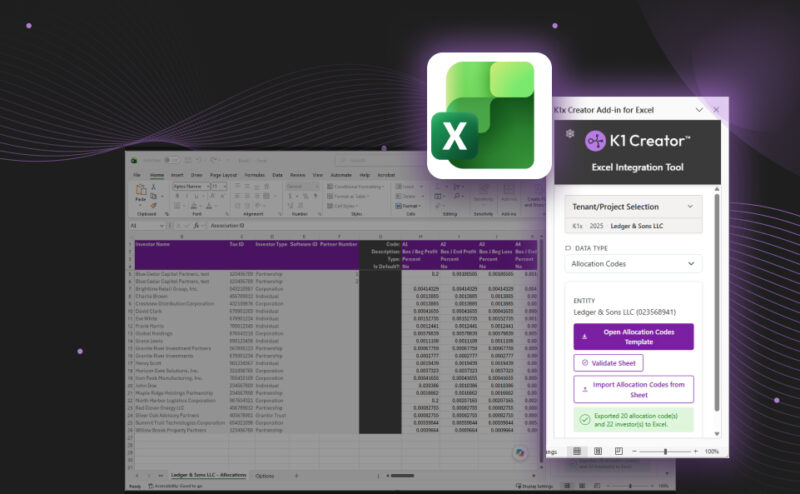
K1 Creator from K1x is the only purpose-built K-1 specific creation platform that works alongside any tax software. It is built on one principle: enter the data once and let the software carry it everywhere.
- Enter partnership data once in a structured grid or in Excel through the K1 Creator add-in.
- Allocation codes flow to every partner’s federal K-1, state K-1s, and K-2/K-3.
- Column-level validation catches errors before they reach a filing.
- Statements personalize to each investor and suppress lines that don’t apply.
- Keep your tech stack. No need to change any tax technology. Supported integrations: GoSystem Tax RS and CCH Axcess Tax.
- Generate thousands of K-1 packages in one bulk run with live status per investor.
- Deliver packages securely through the K1x Investor Portal or download them for your current channel.
- Deliver K-1s as early as Q1, with no dependency on the 1065 return.
K1 Creator works alongside your existing tax compliance and general ledger software. There is nothing to migrate.
See it in action. Request a K1 Creator demo
Conclusion
K-1 preparation is a data problem, not a form problem. The teams that deliver K-1s fastest enter data once and generate every output from it. The right software makes that possible without forcing you to change the tools your team already knows.
Frequently Asked Questions
What is K-1 preparation software?
K-1 preparation software creates Schedule K-1s for each partner in a partnership. Dedicated tools also produce state K-1s, Schedules K-2 and K-3, footnotes, and investor packages from a single data set.